Case study · 2026—ongoing
A design system that compiles
An AI-assisted design-to-code framework for keeping product decisions consistent from Figma to SwiftUI.
01 · The problem
I'm building Corner Coach, an iOS product from zero to launch. To move quickly, I use AI coding agents to implement the product. But speed introduces a familiar problem: the generated interface can be plausible without being faithful to the design system.
A model can reproduce common interface patterns. It cannot reliably know which decisions are specific to a product unless those decisions are made available in a structured, verifiable way.
I wanted to build a framework that would let a designer work with AI without giving up control of the design system.
A design system is more than a collection of colors, type styles, and components. It is a set of product decisions:
- which component should be used;
- which combinations are allowed;
- how states and variants behave;
- which values are semantic;
- which details are specific to this product rather than generic UI conventions.
When those decisions live only in a design file or a written document, an AI agent can miss them. The result may compile, look reasonable, and still drift away from the system.
The challenge became:
How might a designer use AI to create maintainable product code while keeping the design system as the source of truth?
02 · From documentation to enforcement
I began by researching how existing design systems communicate their rules to people and machines. The research showed a progression:
- Document the system so it is easier to understand.
- Give the agent explicit instructions.
- Structure the workflow so important mistakes become difficult or impossible to make.
That third approach shaped the framework.
I initially thought of it as a set of guardrails. More precisely, it is an enforcement harness around a design system: a collection of exports, generated references, checks, and feedback loops that make design decisions available to an AI agent and make drift visible when it happens.
The distinction matters.
A written rule can be ignored. A missing type, unavailable component variant, or failed check is much harder to bypass.
03 · The framework
The framework connects a design system in Figma with an application built in SwiftUI.
Figma is where design decisions are authored. A plugin exports the system into structured tokens, component information, and documentation. A compiler transforms that information into Swift code, assets, and references that can be used by both the application and the coding agent.
The framework also maintains a small set of explicit overrides for information Figma cannot represent. This prevents the system from creating a second source of truth: if Figma can express a decision, it belongs in Figma; if it cannot, the override must be clearly identified and maintained separately.
The flow is:
- Figma
- Export plugin
- Tokens and component data
- SwiftUI implementation
- Deterministic checks
The system is intentionally one-directional. Figma is authored first, and everything downstream is generated from it.
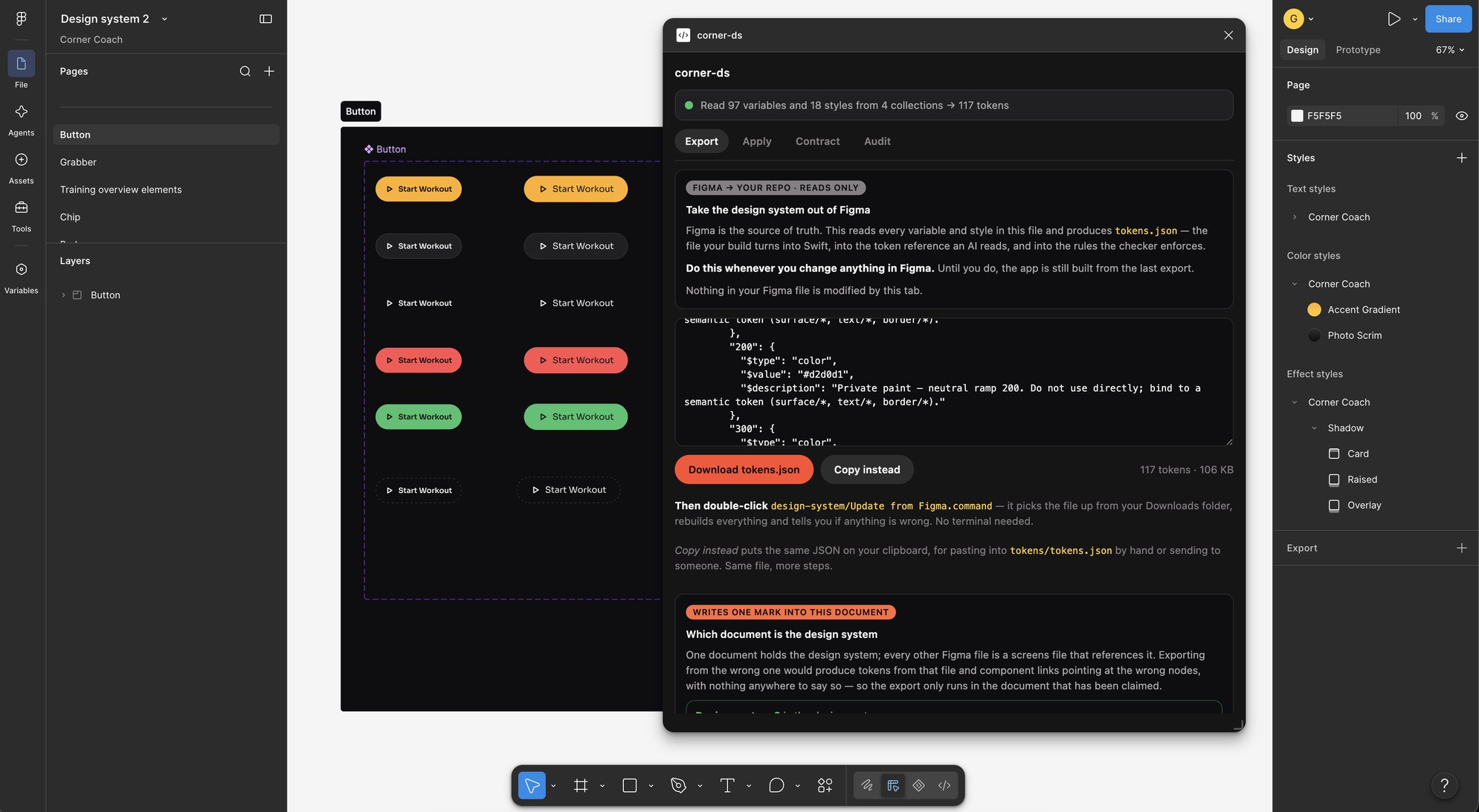
04 · Designing for both sides of the bridge
The design side uses Figma because it is familiar to product designers and accessible to developers and product managers reviewing the work.
It is not a perfect source for code. Some variables and token relationships need interpretation before they can be used in Swift. That gap became part of the framework's purpose: translating design intent into information a coding agent can use without relying on screenshots, manual transcription, or guesswork.
The plugin now helps with tasks such as:
- exporting variables and tokens;
- identifying unlinked values;
- finding components that are not part of the design system;
- checking whether screens use the available tokens and components;
- exporting component descriptions for use during implementation;
- making design-side inconsistencies visible before they reach code.
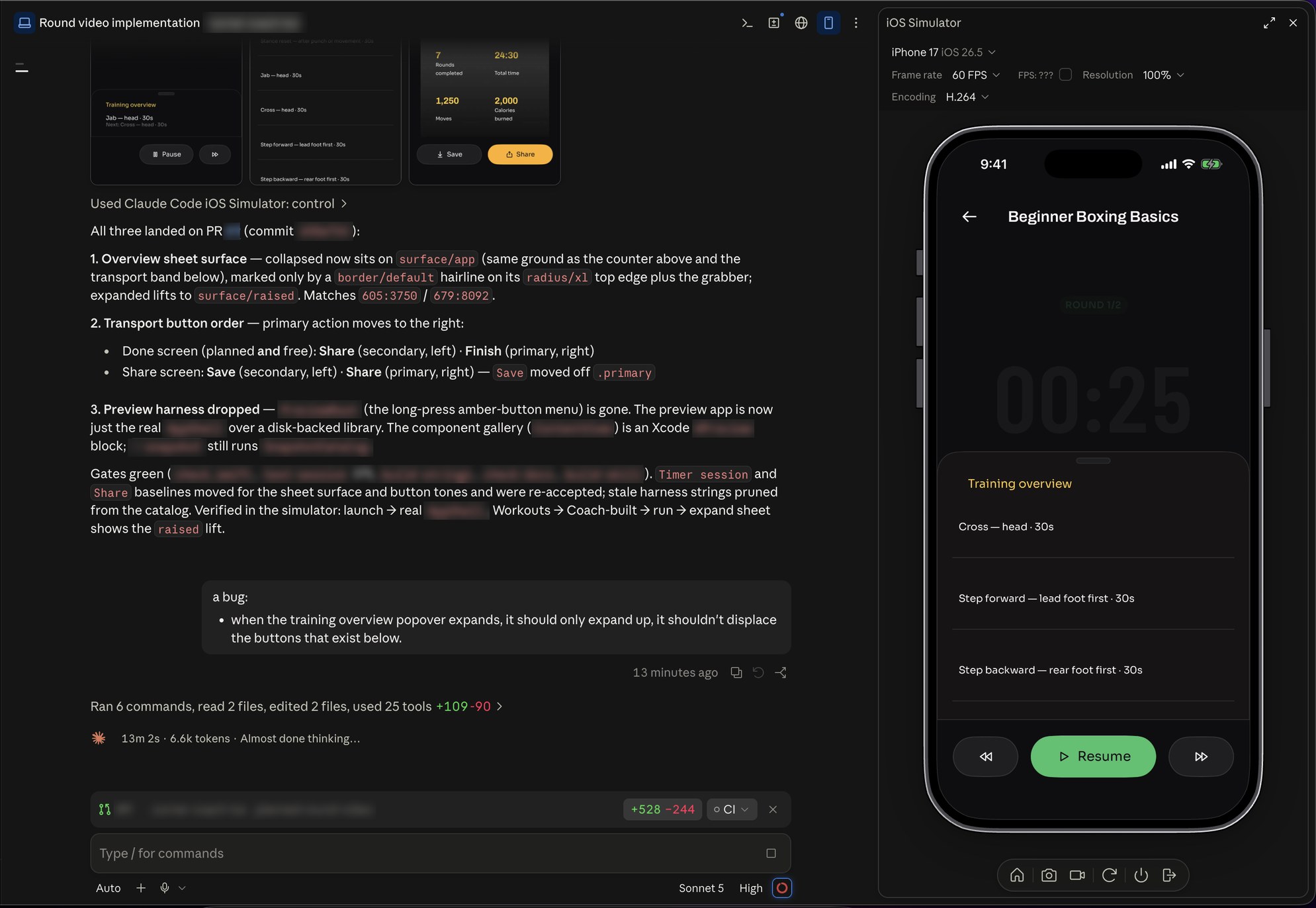
The implementation side is currently Swift and SwiftUI because Corner Coach is an iOS product. The framework is being developed with portability in mind, but this version is deliberately grounded in a real platform and a real product.
05 · Testing the idea through a real product
I started with a small Figma design system containing tokens, variables, and a few basic components. I then used it to build initial screens for Corner Coach.
Those first screens were not only product work. They were tests for the framework.
Each implementation exposed gaps:
- tokens that existed visually but were not represented semantically;
- component variants that had not been defined;
- values that were close to the scale but not actually part of it;
- design decisions that were clear to a person but ambiguous to an agent;
- failures that passed code review because they looked plausible.
After each round, I updated both the product and the framework. The product gave the framework real constraints; the framework made the product more consistent and easier to extend.
06 · Six checks, six different failure modes
The framework does not rely on one large validation step. It uses separate checks because different failures require different forms of verification.
- The compiler
- Checks the exported design data.
- The code checker
- Identifies implementation that bypasses the system, such as raw colors, magic numbers, stock fonts, or hand-built effects.
- The type system
- Limits invalid component combinations and unavailable tokens.
- The runtime check
- Catches failures that compile successfully but render incorrectly, such as a missing custom font falling back silently.
- The design-side audit
- Checks whether the Figma file is following its own tokens, styles, and component rules.
- The context check
- Verifies what the coding agent is being asked to read, ensuring that generated references, documentation, and always-loaded instructions remain accurate and bounded.
The goal is not to make the model perfect. The goal is to make incorrect work difficult to approve and easy to diagnose.
07 · What the framework changed
The framework has changed how I design as much as how I implement.
Because screens are checked against the system, I cannot treat a screen as complete simply because it looks finished. The process forces questions such as:
- What happens in every state?
- Does this component need another variant?
- Is this value semantic or merely convenient?
- What happens when the content is longer?
- Is this interaction represented in the design system?
- Can the implementation use the same decision without inventing a new one?
That has made the framework a design tool as well as a development tool.
It also improved the efficiency of the AI workflow. By tracking where context and model usage were being spent, I separated the work into different stages: planning with a more capable model, implementation with a faster model, and verification with deterministic tools.
The framework is also harness-independent. The same repository can be used by different coding agents, including Codex and Claude, because the important rules live in the project structure and checks rather than in one agent's configuration.
Most importantly, I am using it continuously while building Corner Coach. In less than a quarter, I have taken the product halfway toward launch as a solo designer-builder while continuing to improve the system that supports it.
08 · What it does — and does not — claim
The framework does not prevent an AI agent from producing incorrect code. It does something more useful: it prevents incorrect code from quietly passing as finished.
It does not replace engineering, design review, or product judgment. It does not automatically approve changes to the design file. Every write back into the design system still requires a person to review the change.
It is currently proven on one design system and one iOS product. Its architecture is intended to be reusable, but that portability still needs to be tested on other systems and platforms.
09 · What I learned
The most important lesson is that consistency cannot depend entirely on memory, documentation, or model quality.
If a rule matters, it needs a place in the workflow where it can be checked. If a decision can be represented as a type, token, component API, or deterministic test, it should not remain only as prose.
The framework also taught me that every implementation is an audit of the design system. Building with the system reveals missing semantic tokens, incomplete components, unclear states, and decisions that were never formalized.
In that sense, the product and the framework improve each other:
The product tests whether the framework is useful. The framework tests whether the design system is real.
10 · Where I'm taking it next
The next iterations will test how portable the framework really is:
- adapt the workflow from SwiftUI to React;
- explore how it could integrate with Storybook and similar component documentation tools;
- test Paper as an alternative design environment;
- support a reverse flow in which developers create or update screens in code and bring them back into the design system;
- explore generating new screens entirely from existing design-system components, then taking those screens into Figma for refinement.
The long-term goal is not simply to generate interfaces faster. It is to create a reliable working relationship between design systems, product designers, and AI-assisted development.
Method and findings only · No source, no client work
The documentation → instruction → structure progression in §02 follows the framing in Deloumeau-Prigent, K. (2026). State of AI in Design Systems. CC BY 4.0. Data collected July 2026.